Transkriptor - Speech to Text
- 4.2
- Rating
- 5.00M
- Installs
- Free
- Price
 Analysis by App-foxy
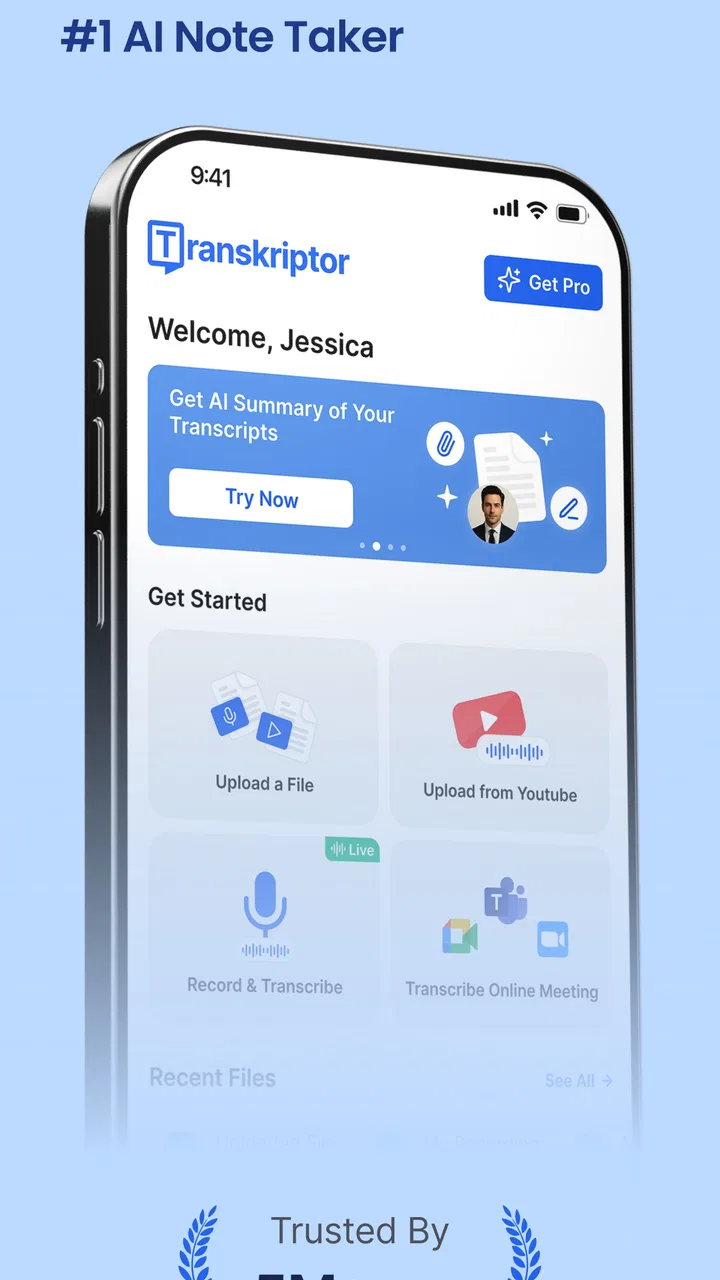
I found Transkriptor - Speech to Text most useful when I stopped treating it as a simple dictation tool and started using it as a bridge between spoken ideas and editable notes. It belongs to the productivity category, is free to install, and is developed by Tor.App. In everyday use, its main appeal is straightforward: I can turn a voice recording, a spoken note, or an audio or video file into text without manually typing every sentence.
That sounds simple, but the practical value depends on when and where you use it. A rushed voice memo after a meeting, a recorded lecture, an interview, or a personal idea can become a searchable draft instead of remaining buried inside an audio file. The experience is not equally convenient in every situation, though. Connectivity, recording quality, background noise, and the amount of editing I am willing to do afterward all affect whether the result feels like a time-saver or merely a rough first draft.
How Transkriptor fits into real mobile work
My first impression was that this is best understood as a productivity assistant rather than a complete writing environment. I would not open it expecting a full project-management system or a replacement for a dedicated word processor. I would open it when the source material already exists as speech or media and I need a text version that I can work with.
You May Also Like

 Blood Strike: 2.5 Anniversary
Blood Strike’s Loadouts Turn Every Drop Into a Tactical Gamble
A close look at Blood Strike’s custom loadouts: how fast access to signature weapons reshapes its battle royale rhythm, rewards preparation, and narrows the gap between fights.

 Pandora - Music & Podcasts
Pandora’s Music Is Easy to Start, but Harder to Recover
Pandora’s strength is its low-effort path from a seed to a station. Its weak spot is how much confidence it asks you to place in connection, setup, and quiet recovery.

 8 Ball Pool
 Is Built on Rivalries, Rematches, and Routine
A close look at the rivalries, rematches, shared routines, and unanswered safety questions that turn a quick pool match into a persistent mobile community.

 Samsung Music
’s Quiet Strength Is Playing What You Already Own
Its reach comes less from spectacle than from dependable access to a personal library. That simplicity is both the app’s strongest retention engine and its ceiling.

 AccuWeather: Weather Radar
AccuWeather Review: A Quick, Clear Forecast for Everyday Decisions
For everyday plans, the best forecast is the one you can understand quickly. AccuWeather makes rain timing, radar, and local conditions easy to act on, with a few trade-offs.

 Hill Climb Racing
Why Hill Climb Racing Still Turns Crashes Into One More Run
A tiny car, a bumpy hill and one more upgrade: Hill Climb Racing keeps resurfacing because its simple chaos makes every near-miss feel personal.
More From Our News Desk
View All News


That distinction matters. Traditional note apps are excellent when I already know what I want to type, while a voice recorder preserves the original conversation but leaves me with the slow job of listening again. Transkriptor sits between those two approaches. It gives spoken content a written starting point, which is especially helpful when ideas arrive faster than my thumbs can keep up.
A realistic example is a commute or walk during which I think through a project. I can record the idea rather than trying to compose polished sentences on a small screen. Later, the transcription gives me a rough outline to clean up. I still need to check names, technical terms, punctuation, and the order of ideas, but that editing is usually easier than recreating the entire thought from memory.
The same workflow can help after a conversation. Instead of searching through a long recording for one detail, I can work from the text and then return to the audio when a phrase needs verification. That is an important trade-off: transcription improves access to the content, but it should not automatically be treated as a perfect official record.
When the network becomes part of the experience
The biggest practical question is not only whether the app can recognize speech. It is whether the moment in which I need it gives the app a reliable path to process that speech. Transcription involves turning audio into text, and in my experience with this kind of workflow, a weak connection can change a quick task into a waiting task. I therefore prefer to start important conversions when I have a stable connection rather than immediately before I need the result.
This is particularly relevant with larger audio or video files. A short voice note is one thing; a long recording creates more material to handle and more opportunity for interruptions. If I am preparing notes for a meeting, I would leave enough time for the conversion and a review pass. I would not record an important discussion and assume the finished text will be ready the moment the conversation ends.
Connectivity also affects how confidently I use the app in public places. On a train, in a crowded café, or in a building with inconsistent reception, I may still capture the original thought, but I would plan the transcription step for a more dependable connection. That separation between capturing and processing is one of the most useful habits I developed while testing the workflow.
For people who expect every feature to work identically in airplane mode or in a remote location, this may not be the ideal tool unless they have already checked how their particular setup behaves. I would not build an emergency workflow around assumptions about offline processing. Instead, I would keep the original recording available and treat the text conversion as a later step.
Using it on a phone without creating more work
Mobile transcription is valuable because the phone is usually where the original audio is created. That convenience can disappear if I record carelessly. I get better results by placing the phone where voices are reasonably clear, avoiding unnecessary movement, and speaking in complete phrases when I am making a personal memo. These small choices reduce the amount of correction required later.
I also found it helpful to decide what the text is for before starting. If I only need a reminder, a loose transcription is enough. If I need meeting notes, I mentally separate decisions, questions, and follow-up actions while speaking. The app can convert the words, but it cannot replace my judgment about which parts deserve attention.
For a student, the useful workflow is not simply “record a lecture and trust the transcript.” A better approach is to record a short spoken summary after each topic, then use the resulting text as a revision outline. For a freelancer, it can be a way to turn an interview or brainstorming session into a rough document. For someone who dislikes typing on a phone, it can make longer notes less tiring.
There is also a privacy-minded reason to be selective. I would avoid casually processing sensitive conversations unless I am comfortable with the way the material is handled and with the people involved. Audio can contain more personal information than the final notes, and a transcription workflow creates another copy of that content in written form. That is not a criticism unique to this app; it is a reason to think before pressing record.
What to do when a transcription goes wrong
No speech-to-text tool should be judged only by its best result. The difficult cases are names, accents, overlapping speakers, specialized vocabulary, low-volume speech, and recordings with music or traffic behind the voice. When the output looks strange, I first compare it with the original audio instead of trying to guess what the sentence was supposed to mean.
A useful recovery method is to treat the transcript as a draft with confidence levels in my own mind. Clear sentences can move directly into notes. Unclear sections get marked for listening. Important figures, names, addresses, and instructions receive a separate check even when the surrounding paragraph looks accurate. This prevents a polished-looking mistake from slipping into a final document.
Long recordings deserve a different strategy from short notes. I prefer to divide my attention into sections rather than edit every line immediately. First I scan for the main ideas, then I return to the passages that matter. This is faster than perfecting punctuation throughout a long transcript that may only be used to find two or three decisions.
If a conversion is interrupted or takes longer than expected, keeping the original source is essential. I would not delete the audio or video just because a text version exists. The source is the recovery copy, and it also lets me confirm wording when the transcription makes an uncertain statement look definite.
Another limitation is that transcription is not the same as summarization or interpretation. A written version may still be lengthy, repetitive, and full of conversational detours. I often get the best result by using the transcript as raw material: I extract tasks, rewrite key points, and remove filler myself. Users looking for a finished article or perfectly organized minutes may find this extra step frustrating.
Being careful with mobile data and large media
Because audio and video files can be much larger than ordinary text notes, I would be cautious about processing them over mobile data. A short spoken memo is relatively easy to manage, but a long video can consume more time and connectivity than expected. When I am working with a substantial file, I prefer a stable connection and I avoid starting the job during a moment when I need the phone for something else.
This is also where the free label needs a little context. The app is free to install, but in-app purchases range from $9.99 to $179.99 per item. That does not automatically make it poor value, but it means I would inspect the available usage limits and purchase choices inside the app before building a regular professional workflow around it. Occasional users may be satisfied without spending, while heavy users should think about how often they will transcribe and whether the cost matches that volume.
I would also keep my file organization simple. Give recordings clear names before or after processing, separate personal notes from work material, and remove duplicate media when I am certain it is no longer needed. This reduces confusion when the same conversation exists as an original recording, a converted text document, and an edited summary.
Data-conscious use is not only about saving bandwidth. It is about choosing the right material to convert. A private brainstorming memo may be low risk, while a client discussion, medical conversation, or confidential meeting deserves more caution. I would ask permission before recording other people and would avoid assuming that a convenient transcription service is automatically appropriate for every setting.
Who will get the most from it
I think this app is a strong match for people who regularly have useful thoughts in spoken form but lose them because typing feels slow. Students, journalists, researchers, interviewers, busy professionals, and creators can all benefit from a faster route from audio to editable text. It is also a sensible option for anyone who wants to dictate longer notes on a phone without composing them one-handed on a small keyboard.
The app has broad reach: it is rated for Everyone, has passed the five-million-install mark, and holds an average rating of 4.2 from around fifty-one thousand ratings. Those figures suggest that it has found a substantial general audience, but they do not remove the need to test it with your own voice, language habits, recording conditions, and file types.
I would be more cautious recommending it to someone who needs legally precise transcripts, flawless speaker separation, or publication-ready text with no proofreading. In those cases, a professional transcription service or a specialized desktop workflow may be a better choice. I would also point frequent offline users toward a solution they have personally confirmed for their connectivity needs rather than assuming this app will cover every remote situation.
People who only write occasional short notes may prefer the built-in voice recorder and keyboard already on their phone. Transkriptor becomes more worthwhile when conversion to text is the central need, especially if the alternative is repeatedly replaying recordings and typing manually.
Version, accessibility, and the learning curve
The current version is 2.2.4, and it runs on devices using Android 7.0 or later. That makes it accessible to many Android users, including people who do not replace their phones frequently. Still, compatibility on paper is not the same as a smooth experience on every device. Available storage, microphone quality, connection stability, and the way a phone handles large files can all influence the result.
I did not find the basic idea difficult to understand, but the best results come from developing a repeatable routine. Record clearly, process when the connection is dependable, review the important sections, and keep the source file until the text has been checked. Once that becomes automatic, the app feels less like a novelty and more like a practical part of a note-taking system.
One subtle advantage is that it changes when I capture ideas. I no longer need to wait until I have time to type a polished paragraph. I can speak a rough version first and shape it later. The downside is that this can create more raw material than I actually need, so I still have to schedule time for sorting and editing. Faster capture is only useful if it leads to clearer action.
My connectivity verdict
After using it as a mobile transcription tool, I see Transkriptor - Speech to Text as a practical first step between spoken content and organized notes. Its strongest role is turning recordings and voice ideas into editable material, not eliminating the need for judgment. The more important the text, the more carefully I would review it against the original audio.
Connectivity shapes the experience more than a store summary might suggest. I would capture ideas wherever necessary, but I would process larger or important files when the network is dependable, keep the original media for recovery, and avoid making assumptions about offline behavior. That approach makes the app more predictable and prevents a weak signal from becoming a lost workflow.
For occasional users, the free starting point makes it easy to experiment. For frequent users, the in-app purchase range deserves attention before committing to a high-volume routine. My recommendation is strongest for students, creators, interviewers, and professionals who regularly need text from speech and are comfortable proofreading the result.
If you want a tool that saves you from typing every spoken idea, this app is worth trying. If you need a perfect transcript immediately, work mainly without connectivity, or handle highly sensitive conversations, I would compare it with a more specialized alternative first. Used with realistic expectations, it can save meaningful time while keeping the final accuracy decision in your hands.
FAQs for Transkriptor - Speech to Text
01What is Transkriptor - Speech to Text used for?
Transkriptor is designed to convert spoken audio into written text. It can be useful for transcribing meetings, interviews, lectures, podcasts, voice notes, and recorded conversations. After uploading or recording audio, the app processes the speech and presents an editable transcript. It can save considerable time compared with manually typing everything, especially when you need searchable notes or a written reference for later.
02How accurate are Transkriptor’s transcriptions?
Transcription accuracy depends on several factors, including recording quality, background noise, speaker accents, speaking speed, and whether people talk over one another. In clear recordings, the results can be very useful and require only light editing, but they should not be treated as perfect. Names, technical terms, punctuation, and unclear sections may still need manual correction before using the transcript professionally.
03Does Transkriptor support multiple languages and different audio formats?
Transkriptor is intended for users who work with more than one language and commonly supports transcription across a broad selection of languages. It can also be used with various recordings and imported media, although the exact language list, supported formats, and available features may depend on the current version of the app or your subscription plan. Check the in-app details before uploading important files.
04Is Transkriptor free to use, or does it require a subscription?
Transkriptor may allow new users to try limited transcription features, but extended usage generally depends on credits, usage limits, or a paid plan. Subscription options can differ between Android, iOS, and the web service, and prices may change over time. Before confirming a purchase, review the billing period, included transcription minutes, renewal terms, and cancellation options shown in the app store.
05Is my audio and transcript data private when using Transkriptor?
Because Transkriptor processes recordings and creates text from them, privacy is an important consideration before uploading sensitive material. Review the app’s current privacy policy and permissions to understand how files, transcripts, account information, and recordings are handled. Avoid uploading confidential conversations, private client information, or protected documents unless you are satisfied with the service’s security practices and have the necessary consent.
Pros
- Accurate transcription for clear recordings and multiple accents.
- Supports several languages for multilingual users.
- Audio files can be imported instead of recording in the app.
- Useful export options make transcripts easy to share or edit.
- Speaker identification helps organize interviews and meetings.
Cons
- Accuracy drops with heavy background noise or overlapping speakers.
- Advanced transcription limits may require a paid subscription.
- Processing longer recordings can take noticeable time.
- Some features depend on a stable internet connection.
- Automatic punctuation and speaker labels may need manual correction.

Transkriptor - Speech to Text
Gallery